
Recover context quickly
Open a case to see its participants, chronological record, latest activity, unread state, and current status together.
A native professional workspace that keeps participants, messages, formal notes, attachments, invitations, and lifecycle status inside one shared case record.
What if professional communication inherited the structure of the case itself?
A local case history and narrow coordination service organize current membership, delivery, presence, catch-up, and revocation without treating a generic chat channel as the durable unit of work.
User value
Give professionals one place to see who is involved, what happened, what was documented, and whether the work remains open.
Open a case to see its participants, chronological record, latest activity, unread state, and current status together.
Add a quick message, a structured note, a system event, or an attachment representation without splitting the record across tools.
Invite participants, mark work resolved, and reopen it when circumstances change while preserving the case history.
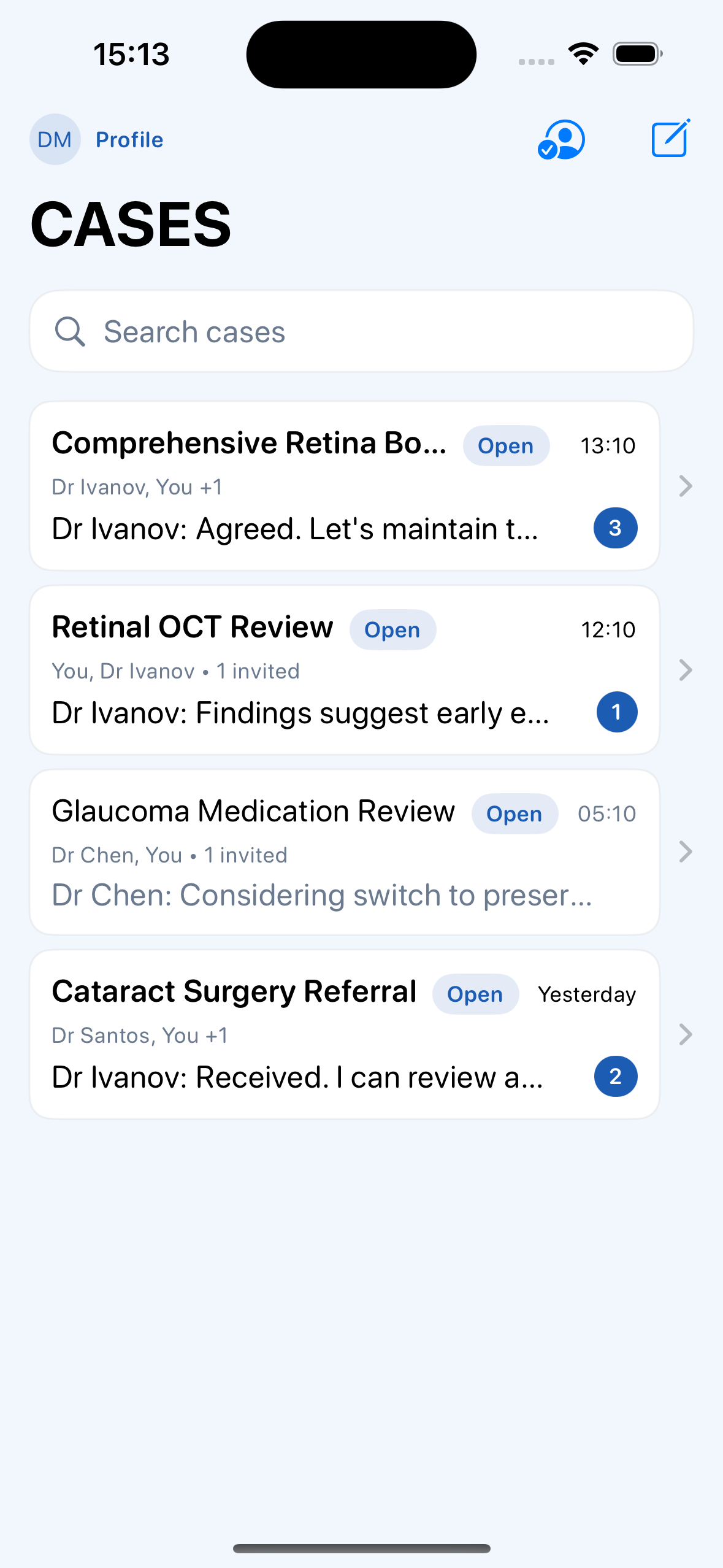 View full size
Features
The current prototype connects local case records, participant state, mixed timeline events, invitations, lifecycle controls, and typed synchronization foundations.
Order active work by recent activity and show title, collaborators, status, preview, time, and unread count in each row.
Keep the title, participant group, status, and case actions visible above the chronological record.
Combine informal text, formal notes, system events, image representations, document representations, and date separators.
Create a case, choose from a seeded professional directory, generate a link invite, or join through a recognized link or token.
Move the case between open and resolved states without discarding the participants or chronological history.
Represent changes as typed envelopes with stable identifiers, checkpoints, retries, deduplication, conflict handling, and accepted or delivered states.
How it works
The interface moves from an activity-oriented inbox into one bounded professional context.
See recent work, participant context, unread counts, and open or resolved state from the dashboard.
Enter one case to see its participants, status controls, messages, notes, files, and system events in time order.
Read the latest formal and informal contributions before adding a response or decision.
Send a message or create and edit a formal note that remains attached to the case.
Select a local directory entry and create a case-specific link or token for the intended participant.
Record when the work is complete and return the case to active status if it needs attention again.
Current interface
These Release-build simulator captures use fictional seeded content. They show prototype workflows, not production clinical use.
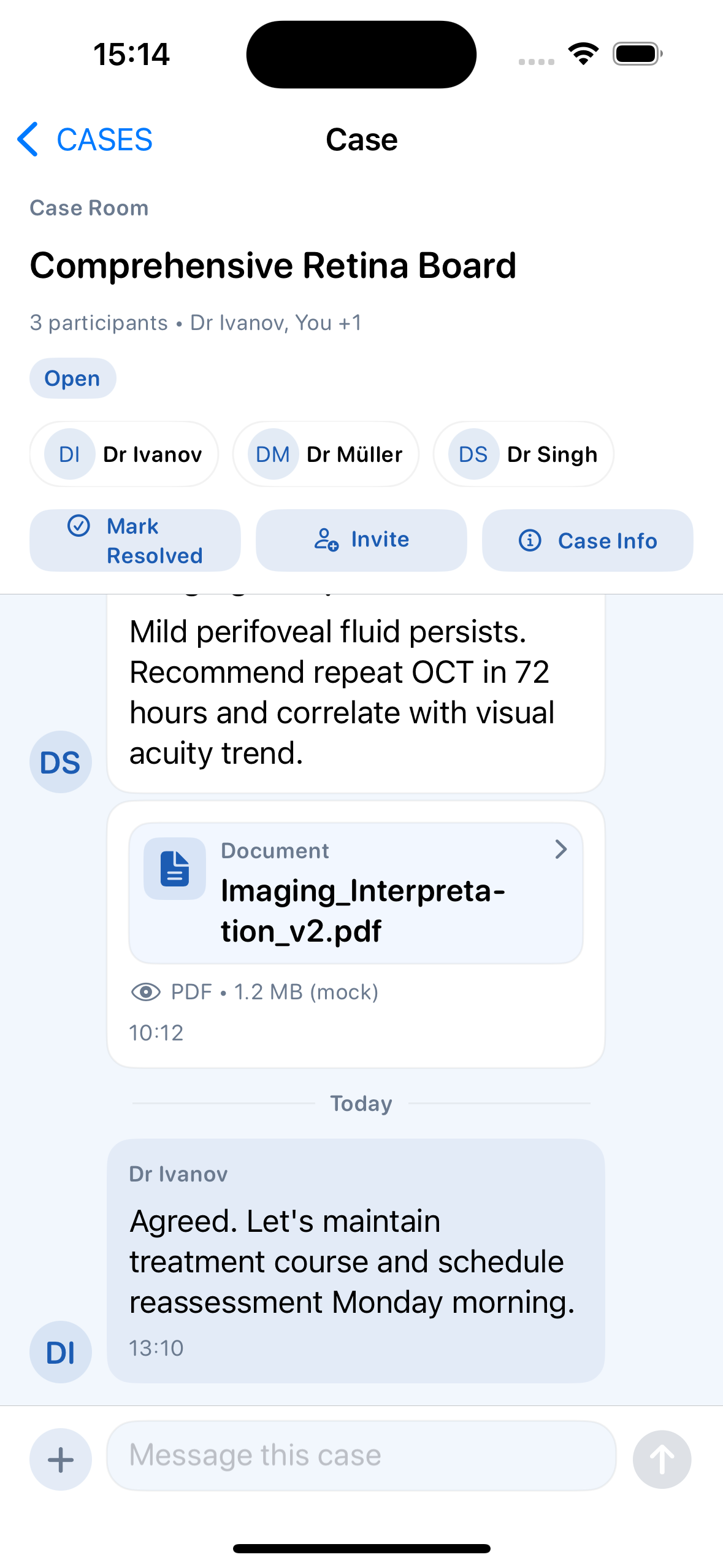 View full size
Participants, status, a formal note, a mock document, the latest message, and the composer share one chronological room.
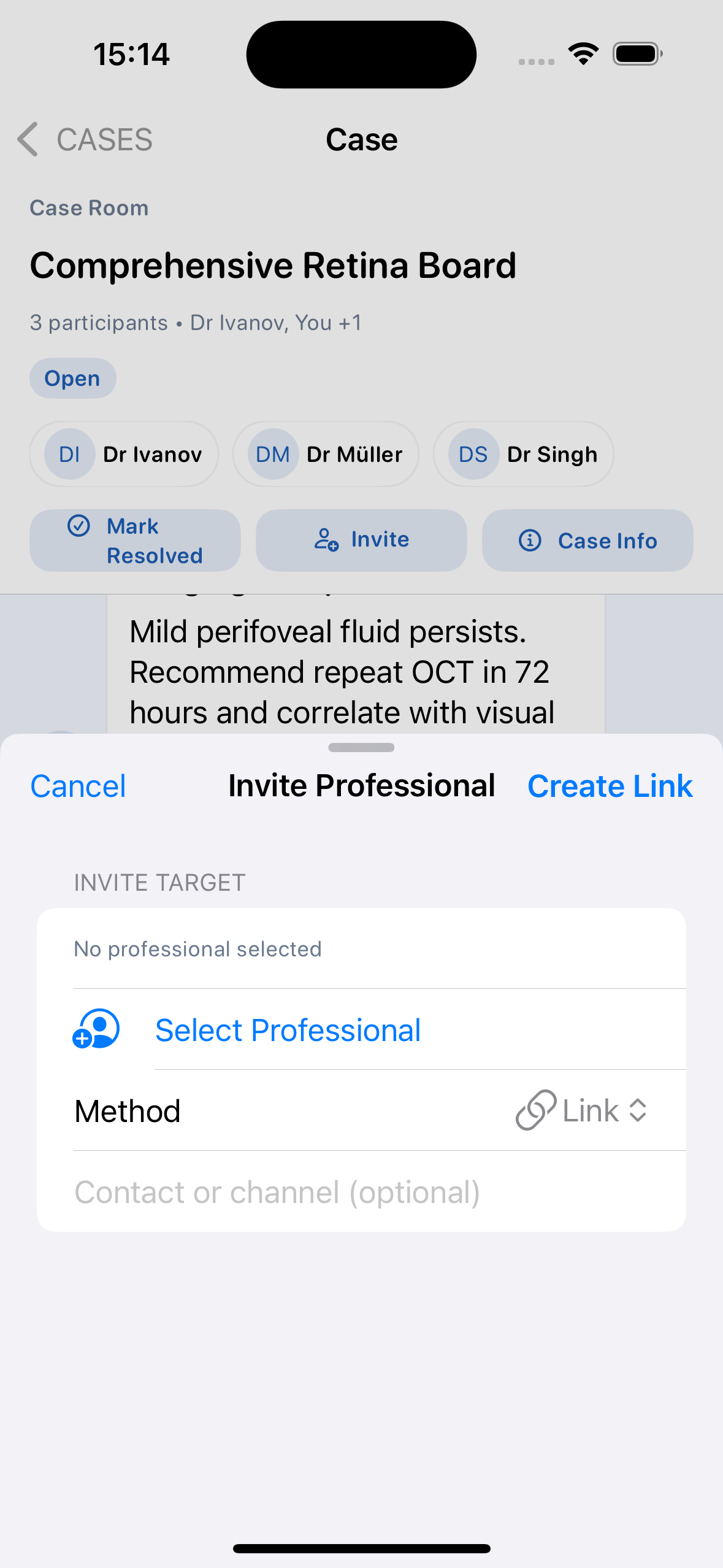 View full size
A case-scoped sheet selects an intended participant and creates a link through the current prototype flow.
Product concept
Communication becomes more useful when membership, evidence, structured notes, decisions, and lifecycle state belong to the work itself.
A professional can enter later and understand the people, chronology, documents, decisions, and current status without reconstructing separate conversations.
Fast messages and deliberate notes remain distinct event types while contributing to the same shared case history.
The architectural direction keeps durable records with participating clients while assigning current membership and delivery coordination to a narrower service.
Architecture
The SwiftUI client owns the case model, local record, attachments, and event application. The Node.js service owns current sessions, membership policy, revocation, presence, rendezvous, relay queues, and wake hints.
Case and profile snapshots live in local JSON files, while attachment representations use the device filesystem.
Device sessions, membership, revocation, expiry, queue limits, and protected actions use current backend state rather than trusting a token alone.
Stable event identifiers, per-target sequence numbers, checkpoints, deduplication, and conflict rules make retries idempotent.
The active client Base64-encodes relay envelopes instead of cryptographically encrypting them, so the page does not claim end-to-end encryption or sensitive-data readiness.
Technology
Development
The native client, local persistence, case workflows, sync models, backend messaging path, and coordination service are substantially implemented and tested. Real-device messaging, cryptographic protection, production identity and storage, real attachments, directory, fax, search, push, accessibility, and regulatory review remain incomplete.
Implemented
Before sensitive or field use
Complete two-device validation with fictional data, implement and review the cryptographic and key-management boundary, replace or gate mock attachments, directory, fax, search, and push behavior, select production identity and persistence services, validate recovery and retention, conduct accessibility testing, and document the intended audience and regulatory scope.
CASES lab notes
Notes about the thinking, architecture, development, and decisions behind this work.
Presence, peer discovery, relay queues, checkpoints, and delivery states joined the native case-room flow.
The server took responsibility for current access and delivery coordination without becoming the intended permanent case-history store.
Identity, membership, invitations, persistence, and sync-ready records turned a timeline into a shared professional object.
A case inbox, chronological timeline, and composer established the product's first durable interaction grammar.
Contact Burrito’s Labs
Questions, product feedback, or something worth exploring.