
Import only what you choose
Select images through PhotosPicker on iPhone and iPad or through file selection and drag-and-drop on Mac without granting a full photo-library scan.
A local screenshot retrieval tool that recognizes text in selected images, explains deterministic matches, and opens the source at the relevant text region.
What if you could find a screenshot by the words visible inside it?
Selected import, app-managed copies, Apple Vision OCR, transparent matching, region highlighting, and live saved queries make retrieval useful without broad photo access, cloud services, or semantic guessing.
User value
Recover reservation codes, receipts, addresses, error messages, and reference notes from selected screenshots without browsing by date or thumbnail alone.
Select images through PhotosPicker on iPhone and iPad or through file selection and drag-and-drop on Mac without granting a full photo-library scan.
Match exact words, phrases, case variants, normalized punctuation and spacing, and optional conservative typos through deterministic local rules.
Open the screenshot from a ranked result and emphasize the recognized-text block that produced the match.
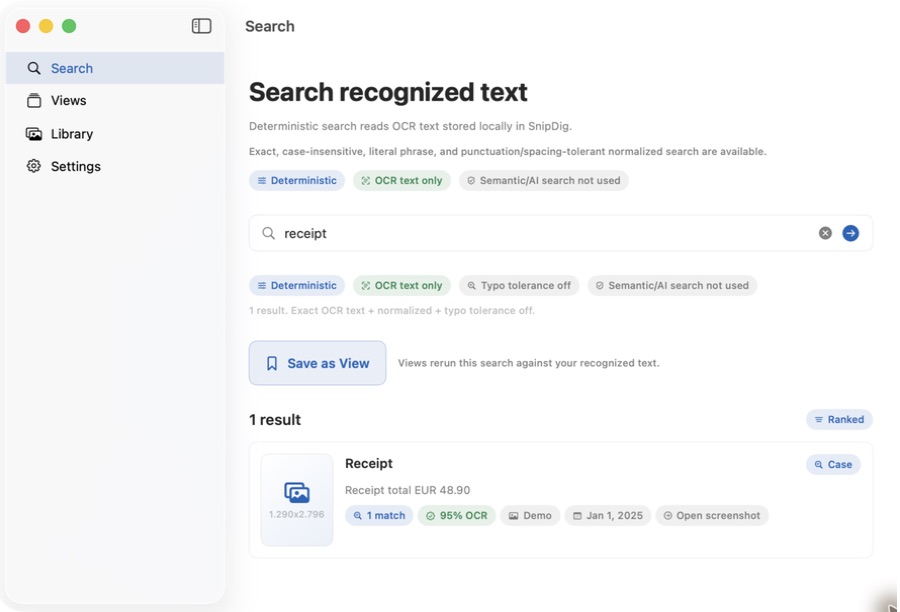 View full size
Features
The current code connects import, managed image storage, OCR, explainable search, screenshot detail, and live saved queries across Apple devices.
Use PhotosPicker on iPhone and iPad or PNG, JPEG, HEIC, and TIFF file selection and drag-and-drop on Mac.
Copy accepted bytes into SnipDig storage, generate local thumbnails, filter duplicates through source identifiers and hashes, and leave the original item untouched.
Queue single or batch recognition, preserve original text, confidence, and normalized bounding boxes, and represent pending, completed, failed, and retry states.
Support exact, literal phrase, case-insensitive, normalized, optional diacritic-insensitive, and option-gated typo matching without semantic expansion.
Return original-text snippets and match labels, rank stronger evidence above weaker evidence, and carry the matched OCR block into screenshot detail.
Save, rename, edit, pin, unpin, or delete a query that reruns against current OCR data, with optional deterministic suggestions from local usage signals.
How it works
SnipDig makes screenshots retrievable without asking the user to classify them into a new folder system.
Select screenshots or other supported images through the platform-specific picker or Mac drag-and-drop surface.
Hash and filter duplicates, copy accepted bytes into local application storage, and generate session thumbnails.
Run Apple Vision through the live service boundary to produce OCR blocks with text, confidence, and source-image coordinates.
Enter a literal query and apply visible normalization or optional typo settings without expanding it into hidden related concepts.
Open the ranked result, see the recognized block in the original image, and copy selected, matched, or complete OCR text.
Create a View that reruns the query against the current index without owning or duplicating screenshots.
Current macOS demo
These Debug captures use fictional records and deterministic mock services. They demonstrate implemented interfaces, not the unresolved production persistence and live-runtime wiring.
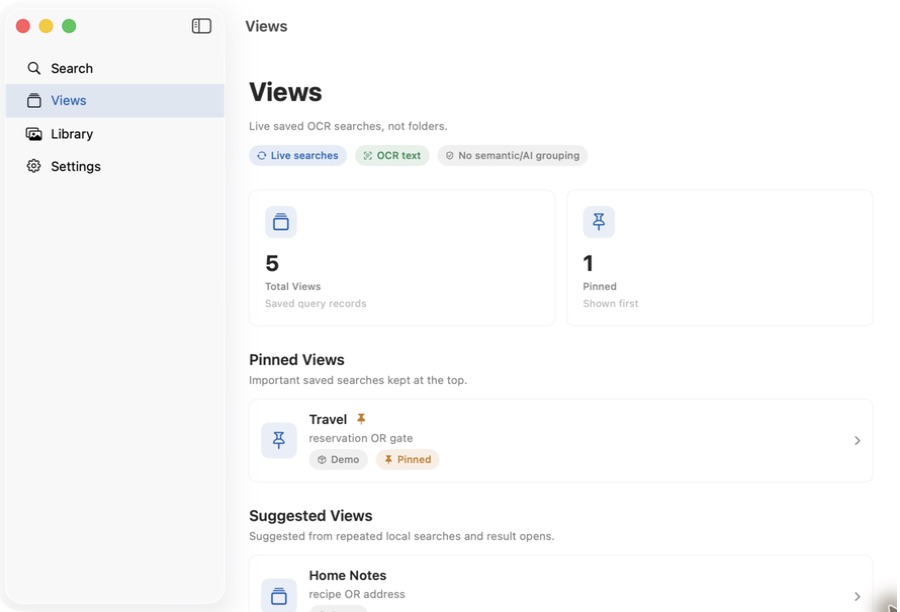 View full size
Manual and suggested Views store query metadata and rerun against the current OCR index without owning image or result records.
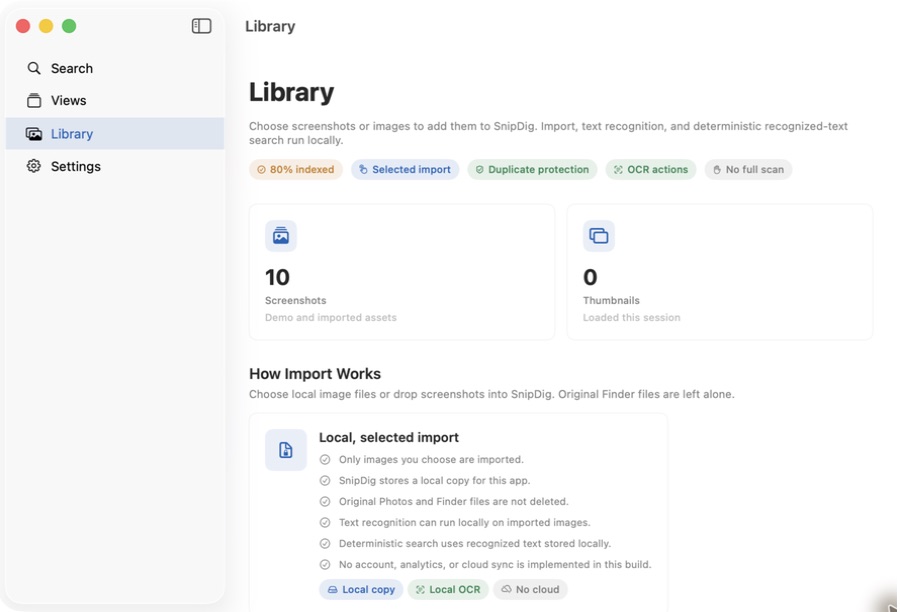 View full size
The Library explains selected import, app-managed copies, local OCR, duplicate protection, and the absence of a full-library scan.
Product concept
Useful screenshot details can become searchable without replacing the image, forcing folder organization, or inferring concepts that are absent from recognized text.
People can keep the existing screenshot habit and recover a detail from remembered words without classifying every image in advance.
Normalization and optional typo matching can handle OCR and memory imperfections while keeping exact source text, rank order, and match explanations visible.
Saved retrieval stays current as the library changes and can be deleted without affecting screenshots, OCR blocks, or manual content ownership.
Architecture
Shared SwiftUI navigation, platform-neutral domain models, actor-backed services, local files, Apple Vision, deterministic search, and geometry mapping support iPhone, iPad, and Mac without a SnipDig server.
Platform pickers produce neutral payloads, original files remain outside SnipDig's deletion boundary, and only managed copies and records are removed.
OCR, matching, ranking, history signals, Views, and suggestions run locally with no network, account, analytics, CloudKit, or third-party package dependency.
Normalized representations support matching, while source OCR text and mapped bounding boxes remain the basis for snippets, copying, and image-region emphasis.
A live environment selects the Apple Vision service, but the current application entry point launches the mock environment with fictional records and in-memory repositories.
Technology
Development
Seven implementation phases cover adaptive interfaces, selected import, managed image files, Vision OCR service code, deterministic retrieval, source-region navigation, and live-query Views. The current executable still launches fictional mock services, and metadata, OCR blocks, settings, Views, history, and usage signals disappear with the process.
Implemented
Before a dependable personal library
Implement durable local persistence behind the existing repositories, make environment selection explicit, and exercise a complete live import-to-Vision-to-search flow outside test doubles. Reconcile stale typo copy and literal OR demo queries, complete hands-on accessibility review, and capture a real staged image with its matched OCR region before expanding optional helper, Spotlight, or App Intents work.
SnipDig lab notes
Notes about the thinking, architecture, development, and decisions behind this work.
A View became query metadata that reruns against current OCR blocks rather than a folder or static screenshot collection.
Normalization and optional typo matching handled imperfect OCR and memory while preserving source text, rank order, and explanations.
Ranked OCR results began carrying their matched text block into screenshot detail and the corresponding visible image region.
Platform pickers, managed local copies, duplicate protection, and Apple Vision turned selected images into searchable OCR material.
Common domain models, state, protocols, and adaptive navigation established one product across iPhone, iPad, and Mac.
Contact Burrito’s Labs
Questions, product feedback, or something worth exploring.